The 60-second triage
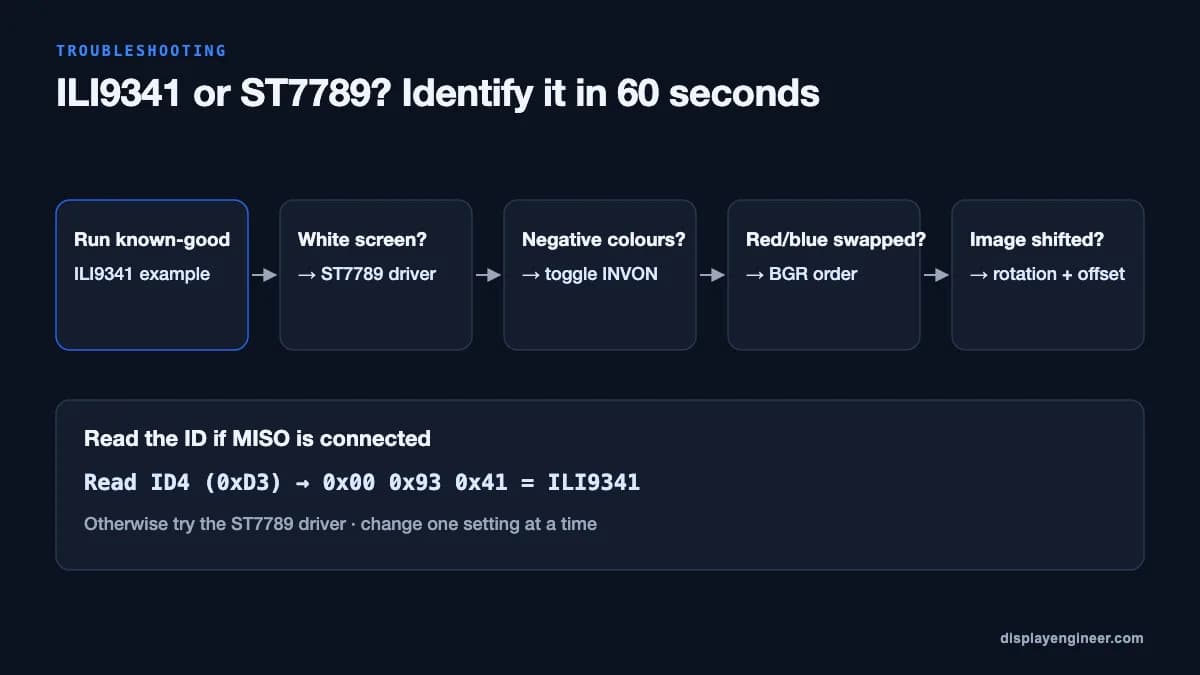
- Run a known-good ILI9341 example with your pins.
- White screen? Switch to the ST7789 driver and run it again.
- Image appears but looks like a photo negative? Toggle inversion.
- Red and blue swapped? Switch the colour order to BGR.
- Image shifted or cut off? Fix rotation and, on 240×240 panels, the offset.
Change one setting at a time and keep the known-good example to compare against.
Why the same board can have a different controller
Low-cost display boards are built from panels bought on the open market. When a batch changes supplier, the controller can change too, while the board name, PCB and pinout stay the same. The ESP32-2432S028R (Cheap Yellow Display) and the ESP32-2432S024 both exist in ILI9341 and ST7789 versions.
Identify it by symptoms
What you see with an ILI9341 setup | Likely cause | Fix |
|---|---|---|
White or blank screen, backlight on | Controller is ST7789 | Switch to the ST7789 driver |
Image appears, colours look negative | ST7789 panel needs inversion | Toggle inversion ( |
Red and blue swapped | Colour order | Set BGR order ( |
Image mirrored or offset | Rotation / memory access setting | Change rotation (MADCTL) |
Everything dark | Backlight pin wrong or reused | Check the backlight GPIO |
Colours wrong? Rule out software first
Before you suspect the panel, check these settings. Each one produces a wrong-colour image on a panel that is working correctly.
What you see | Software cause | Fix |
|---|---|---|
Red and blue swapped, green correct | Colour order: the MADCTL BGR bit does not match the panel | TFT_eSPI: |
Colours look like a photo negative | Display inversion is off (or on) when the panel needs the opposite | Toggle inversion: |
Shapes are right but colours are scrambled, with noise in smooth gradients | The two bytes of each RGB565 pixel are sent in the wrong order | LVGL 8: |
Colours and image garbled on an ILI9488 over SPI | 16-bit pixels sent to a controller that expects 18-bit pixels over SPI | Send RGB666 (3 bytes per pixel); see ILI9488 |
Fix one row at a time, starting from the top. If every row is ruled out and a known-good example still shows wrong colours, send us a photo through Ask an Engineer.
Identify it by reading the ID
If the board connects the panel's MISO line, you can read the controller ID instead of guessing. An ILI9341 answers 0x9341 to the Read ID4 command (0xD3): the datasheet lists the bytes 0x00, 0x93 and 0x41 after a dummy read. In TFT_eSPI, tft.readcommand8(0xD3, n) reads byte n of a register. If you do not get 0x93 and 0x41, try the ST7789 driver. Boards without MISO cannot be read, so use the symptom table.
Real readings from real boards
The datasheet defaults are a starting point, not a guarantee. ropg's spi_lcd_read project publishes raw register dumps from actual boards, and they show three traps:
Board | Controller | 04h, sequential read | D3h, indexed read |
|---|---|---|---|
ESP32-2432S028 (original CYD) | ILI9341 | 00 00 00 | 41 00 93 41 |
Guition ESP32-2432S024 | ILI9341 | 00 00 00 | 41 00 93 41 |
CYD2USB | ST7789 | 85 85 52 | 00 00 00 00 |
Guition JC2432W328 | ST7789 | 81 81 B3 | 00 00 00 00 |
- Not every ST7789 answers 85 85 52. That is the ST7789V datasheet default, but the Guition JC2432W328 returns 81 81 B3. The NanoVNA-D firmware defines
0x8181B3asST7789P3_IDand treats it the same as the ST7789V's0x858552. - The ILI9341 ID only appears with an indexed read. On both ILI9341 boards a plain sequential read of D3h returns zeros. The
93 41only appears when D3h is read the indexed way. - The ILI9341 returns nothing on 04h. So a non-zero 04h read with zeros on D3h points to the ST7789 family.
A practical order: read D3h indexed first, and if the last two bytes are 93 41 it is an ILI9341. If D3h is zero but 04h returns non-zero bytes, treat it as ST7789 family and log the bytes, so you know which batch you have.
The same listing can carry either controller. In Gume issue #200 a CYD2USB ran on the ILI9341 driver with washed-out colours and needed the ST7789 driver. In SquachWatch-CYD issue #88, a 2.4″ ESP32-2432S024R showed a noise band across the bottom quarter, washed-out colours and mirrored text until TFT_eSPI's ILI9341_2_DRIVER was selected and inversion turned on. The reporter describes it as a panel-batch difference, not a fix for every board.
Two habits avoid most of this. Confirm the pinout before you try drivers. And do not assume that a module with the same FPC outline has the same controller.
What the datasheets say
| ILI9341 (Ilitek) | ST7789V (Sitronix) |
|---|---|---|
Resolution | 240×320 | 240×320 |
Frame memory | On chip | On chip, 240×320×18 bit |
Minimum serial write cycle | 100 ns (about 10 MHz) | 66 ns (about 15 MHz) |
Reset pulse / reset-cancel time | ≥10 µs / 5 ms (120 ms in Sleep Out) | ≥10 µs / 5 ms (120 ms in Sleep Out) |
ID command worth trying | Read ID4 (0xD3) | Read display ID (0x04) |
Libraries commonly run both controllers far above these write-cycle figures, and most modules cope. If you see random pixel errors, drop to the datasheet rate before suspecting anything else.
The 240×240 offset trap
Square 240×240 ST7789 panels use a controller with 240×320 memory. Depending on rotation, the visible area starts part-way into that memory, so the image appears shifted or wraps unless the driver applies a row or column offset. Libraries such as TFT_eSPI and LovyanGFX handle this when you choose the correct panel size.
Settings that differ
Item | ILI9341 | ST7789 |
|---|---|---|
TFT_eSPI driver | | |
LovyanGFX | | |
ESP-IDF | | |
Inversion | usually off | often on |
Templates for both are on the ILI9341 and ST7789V pages.
Avoiding this in a product
For a product, specify a module whose datasheet names the controller and whose supplier fixes it per production lot, so firmware does not break between batches. Our 2.8-inch 240×320 SPI module uses a specified ST7789V; samples start at 1 pc. If the screen stays white whichever driver you choose, work through the white-screen checklist.
Frequently asked questions
Can ILI9341 code run on an ST7789?
Not reliably. Both are 240×320 controllers, but the initialisation sequence differs, so change the driver rather than patching the ILI9341 code.
Why are the colours inverted on my ST7789 display?
Many ST7789 panels need display inversion (INVON). Enable TFT_INVERSION_ON or call tft.invertDisplay(true).
How do I read the controller ID?
With MISO connected, read register 0xD3 (Read ID4): an ILI9341 returns 0x93 0x41. Without MISO, identify it by symptoms.
Why is my 240×240 ST7789 image shifted?
The controller has 240×320 memory, so 240×240 panels need a row or column offset that depends on rotation. Select the 240×240 panel size in your library so it applies the offset.
Sources
- ILI9341 datasheet (Ilitek, via Adafruit)
- ST7789V datasheet (Sitronix, via Newhaven Display)
- TFT_eSPI library
- LovyanGFX library
- Espressif esp_lcd_ili9341 component
- LVGL 8.3 lv_conf_template.h (LV_COLOR_16_SWAP)
- LVGL 9.2 lv_draw_sw.h (lv_draw_sw_rgb565_swap)
- Espressif esp_lvgl_port README (swap_bytes)
- ropg/spi_lcd_read: register dumps from real boards (boards.md)
- DiSlord/NanoVNA-D lcd.c (ST7789P3_ID 0x8181B3)
- Gume issue #200: CYD2USB needs the ST7789 driver
- SquachWatch-CYD issue #88: ESP32-2432S024R needs ILI9341_2 and inversion
- Display Engineer examples: IDENTIFY-CONTROLLER.md